Show what your crew holds. In seconds.
QualCard turns the credentials your business holds on file into scannable digital cards. When a site manager, client, or auditor asks what credentials your crew holds, they show the card from their phone, not a paper folder.
Your team’s credentials on their phone, ready to show on the spot. No paper folder, no calls to the office.



A portable copy of the records you keep.
QualCard is a digital credentialing platform for businesses with credentialed workers.
Employers manage their team’s records through an admin dashboard:
- Qualifications
- Competencies
- Site Inductions
- Permits & Certificates
Plus any custom category your business needs.
Employers manage their team’s records through an admin dashboard: Qualifications, Competencies, Site Inductions, Permits & Certificates, plus any custom category your business needs.
Each worker gets a digital card that displays those records, scannable from any phone via its QR code.
QualCard is a record-keeping and access tool, not a credential-checking service. Records are maintained by employers; we don’t check qualifications against issuing bodies. The card is a portable copy of your records, not a third-party endorsement.
Try a live QualCard
Tap to view a live QualCard
Built for industries where credentials matter on site.
Born in NZ traffic management and civil. Works equally well anywhere a crew’s Qualifications, Competencies, Site Inductions, and Permits & Certificates need to be shown on demand.
Traffic management & civil construction
STMS, TM qualifications, Site Safe Safety Card, machinery tickets, branch and site inductions. Every credential your crew already holds, now on a digital card they can show from their phone.
Primary audienceTrades
Builders, electricians, plumbers, gasfitters, scaffolders. Site Safe, EWP, gas certs, refresher tickets, kept current and ready to scan, no folder of paperwork in the ute.
Use caseHealthcare
Practising certificates, vaccinations, ward inductions, scope of practice records. Same record-keeping pattern, different industry.
Use caseHospitality
Manager’s certificates, food safety, allergen training. Keep your team’s compliance records on hand for the next inspection, the next health visit, the next time someone asks.
Use case
And anywhere else credentials matter. If your industry isn’t shown, get in touch.
Onboard, attach, scan.
- Step 01
Get your team on QualCard
Add your team to the dashboard, one by one or in bulk by CSV upload. Each worker gets their own digital card, ready to carry with them on their phone.
- Step 02
Attach the records you hold
Upload each worker’s credentials, with or without expiry dates. The dashboard tracks what’s current and flags refreshers and renewals before they fall due.
- Step 03
Show credentials on the spot
Every worker has their card on their phone. When credentials are asked for, they show it then and there, or share the QR code for anyone to scan.
Manage your team's credentials in seconds.
One admin surface for the records you hold on file. Add a worker, attach a credential, keep records current.

Quick Actions

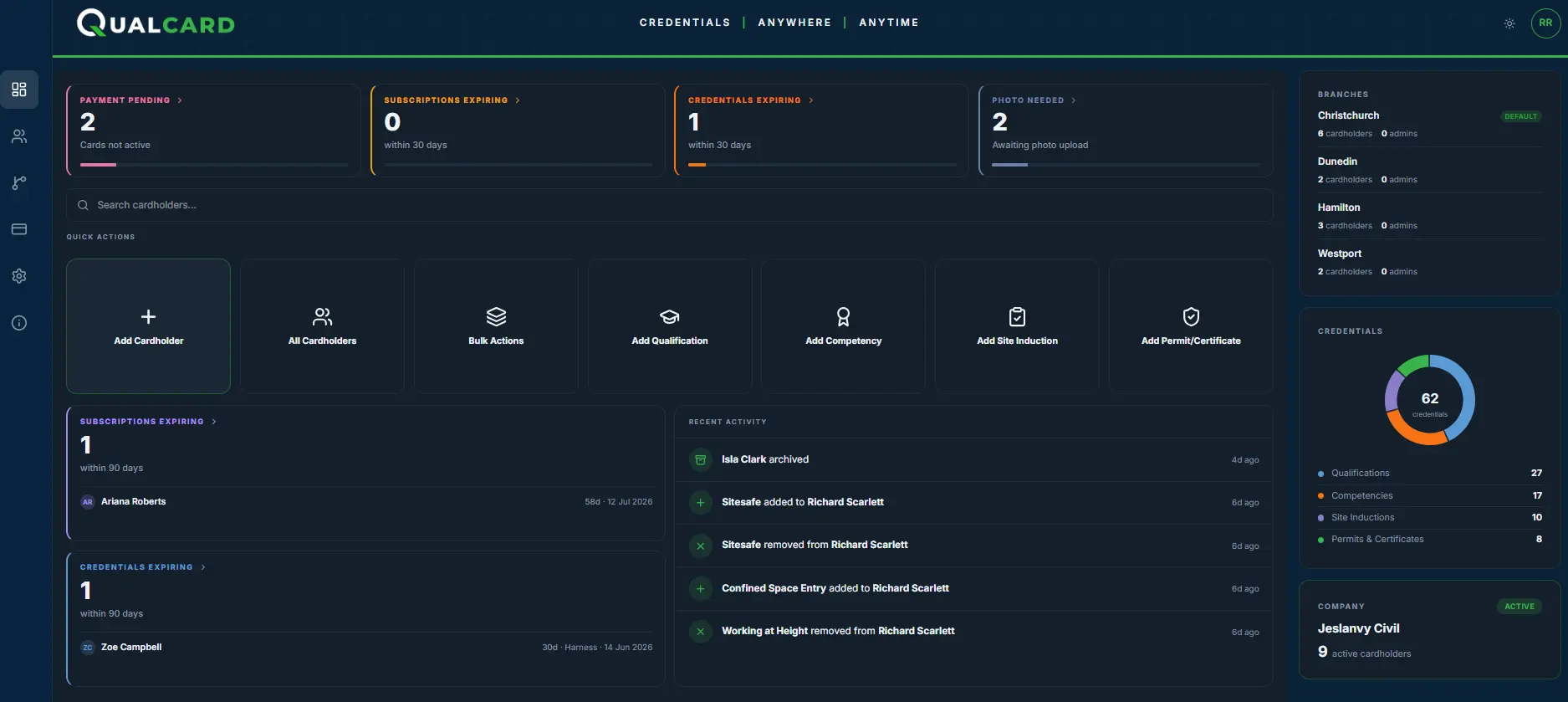
Decide who sees what.
One Company Admin runs the account by default. The business manages all records centrally; workers don’t add or edit credentials themselves.
If you want to delegate by branch, add Branch Admins per location with access scoped to their own crew.
Every admin action is logged.
Company Admin
All branchesSees every branch, every cardholder, every credential. Invites and removes Branch Admins. The default account holder for any business.
- All branches, all cardholders
- Adds and deactivates cardholders across the business
- Manages credentials across the business
- Invites and removes Branch Admins
Branch Admin
Their branch onlySees only their own branch's cardholders and credentials. Day-to-day management without business-wide access.
- This branch only
- Adds and deactivates cardholders in their branch
- Manages their own crew's records
- Cannot invite other admins
Three moments
that go wrong.
Three scenarios. ClickTap to see what breaks, and how QualCard handles it.
An inspector walks in unannounced.
- Folder hunt begins
- Calls to the training provider
- Inspector still waiting
- Search the dashboard
- Open the cardholder
- Records on screen in seconds
- Folder hunt begins
- Calls to the training provider
- Inspector still waiting
- Search the dashboard
- Open the cardholder
- Records on screen in seconds
- Nobody noticed it was due
- Renewal date passes
- Worker turns up with a lapsed ticket
- Dashboard flags it weeks ahead
- Renewal sorted in advance
- No-one turns up with a lapsed ticket
- Worker phones the office
- Office trawls the shared drive
- Worker waits onsite
- Worker shows the card
- Site manager sees the records
- Records on screen, on the spot
One price. One tier. Per worker, per year.
No locked features, no complicated pricing tiers, no hidden costs. Just simple per-worker pricing.
- 10 workers$950 + GST / year
- 25 workers$2,375 + GST / year
- 50 workers$4,750 + GST / year
- 100 workers$9,500 + GST / year
300+ workers? Talk to us about volume pricing.
- Admin dashboard with branch management
- Unlimited records across all categories: qualifications, competencies, site inductions, permits & certificates
- Refresher and expiry reminders
- Digital card per worker, scannable from any phone
- Unique Public card page for every worker
- Automated reminders before anything lapses or falls due
- Activity log of every admin action
Annual billing, invoiced in NZD + GST.
Common questions.
Short answers. Send us anything else through the contact form below.
Does QualCard check credentials against issuing bodies?
No. QualCard is a record-keeping and access tool. The records on a card are what the employer has entered and holds on file. We don’t check them against issuing bodies (Site Safe, NZQA, training providers, etc.).
The card is a portable, scannable copy of the records you maintain. Keeping that data accurate is the employer’s responsibility. QualCard sits alongside whatever credential-checking process you already use, not in place of it.
Can I add other types of records beyond the four default categories?
QualCard groups records into four categories: Qualifications, Competencies, Site Inductions, and Permits & Certificates. These cover what most civil and traffic management businesses need on day one. If your industry uses different categories or you’d like a custom one (for example: Medical Clearances, Driver Endorsements, Working with Children Checks, Food Safety Certifications), get in touch. We’re actively adding categories as customers ask, and we’d rather build what you actually use than guess.
How do workers keep their QualCard on their phone?
Their card lives on their phone. Once a worker’s QualCard is set up, they save it to their phone’s home screen so it opens fullscreen with one tap, the same way an installed app would.
On iPhone:
open the card link in Safari, tap the Share button, then “Add to Home Screen.” Toggle “Open as Web App” on before tapping Add.On Android:
open the card link in Chrome, tap the menu (three dots), then “Add to Home screen.”The card opens from a home-screen icon, ready to show a site manager, client, or auditor in a couple of taps. Nothing to install from the app store. If a worker swaps phones, they re-add it the same way using the link the employer originally sent them.
Who manages the credentials on a QualCard?
The employer does. Company Admins (typically the people responsible for compliance across the business) and Branch Admins (usually the people running each location) are the only ones who can add, update, or remove credentials on a card. Workers don’t add or edit anything themselves; the records are managed by the business. This keeps the data consistent with what the employer holds on file and means the worker’s card always reflects the employer’s current view of their credentials.
How does scanning work?
Any smartphone can scan a QualCard’s QR code with its built-in camera, no app required. The QR opens a public webpage showing the worker’s photo, name, employer, branch, and the records on file. Updates made in the dashboard appear instantly on the next scan.
Can I have multiple admins?
Yes, at no extra cost. QualCard’s per-worker pricing covers all admin access. Most businesses run one or two Company Admins across the business plus a Branch Admin per location. Every admin action is logged.
Do you offer volume pricing?
Yes, for businesses with 300 or more workers. Our standard rate is $95 + GST per worker per year, but for teams above 300 we’ll talk through pricing on a case-by-case basis. The exact rate depends on your team size and contract length. Get in touch for a quote.
What if a worker leaves before their card's 12-month term ends?
A Company Admin or Branch Admin deactivates the card when the worker leaves. There are no refunds or pro-rata on the unused portion of the subscription. When a new worker joins, you set up a new card for them at $95 + GST. This keeps billing simple and reflects that the card represents a specific person, not a transferable seat.
Why aren't cards transferable?
A QualCard is tied to the worker it was set up for. The card’s public URL contains their name and stays linked to them for the life of the card. We don’t allow names to be changed or cards to be moved between workers.
This is deliberate, not a limitation. If cards could be reassigned, the link between worker and record would break and the card would no longer mean what it says. When a worker leaves and a new one starts, you set up a new card. Adds about 60 seconds to onboarding and protects the integrity of every QualCard in circulation.
Is there a free trial?
No. The credentialing problem isn’t solved by a 14-day window. The faster route is a 20-minute call where we walk you through the dashboard with your scenario in mind, then you decide. Pricing is plain enough that there’s nothing hidden to discover. Get in touch to see it.
What happens if I cancel?
You let your annual subscription lapse and the cards deactivate at the end of the term. Public scan pages return a clear “card no longer active” state. No hostage-taking, no data export fee, no contract cliff to climb out of. We aim to be worth keeping rather than hard to leave.
Ready to see QualCard in your hands?
Questions, demo requests, or anything else, we'd like to hear from you.